
My Portfolio
This is a selection of applications I have designed, scrubbed of client-identifying detail. Each one starts with a business problem, not a technology, and the write-up covers both: what the business needed, and how the architecture delivers it.
System ‘X’ — Lead Generation from Public Records
The business problem
The business needed sales leads for a type of business that appears on no general listing. There is no directory to buy and no association roster to mine. The businesses can be found, though: zoning and property tax records identify the properties they operate from.
That only gets halfway. The owner of record on a tax roll is usually a corporation, not a person, so a tax record alone yields a company name and a mailing address rather than someone to call. The actual owner sits one layer further down, in the state’s corporate registry, which records who stands behind each corporation.
System X joins the two: find the properties in the tax records, drill through the corporate listings to the people who own them, and make the result searchable in plain language.
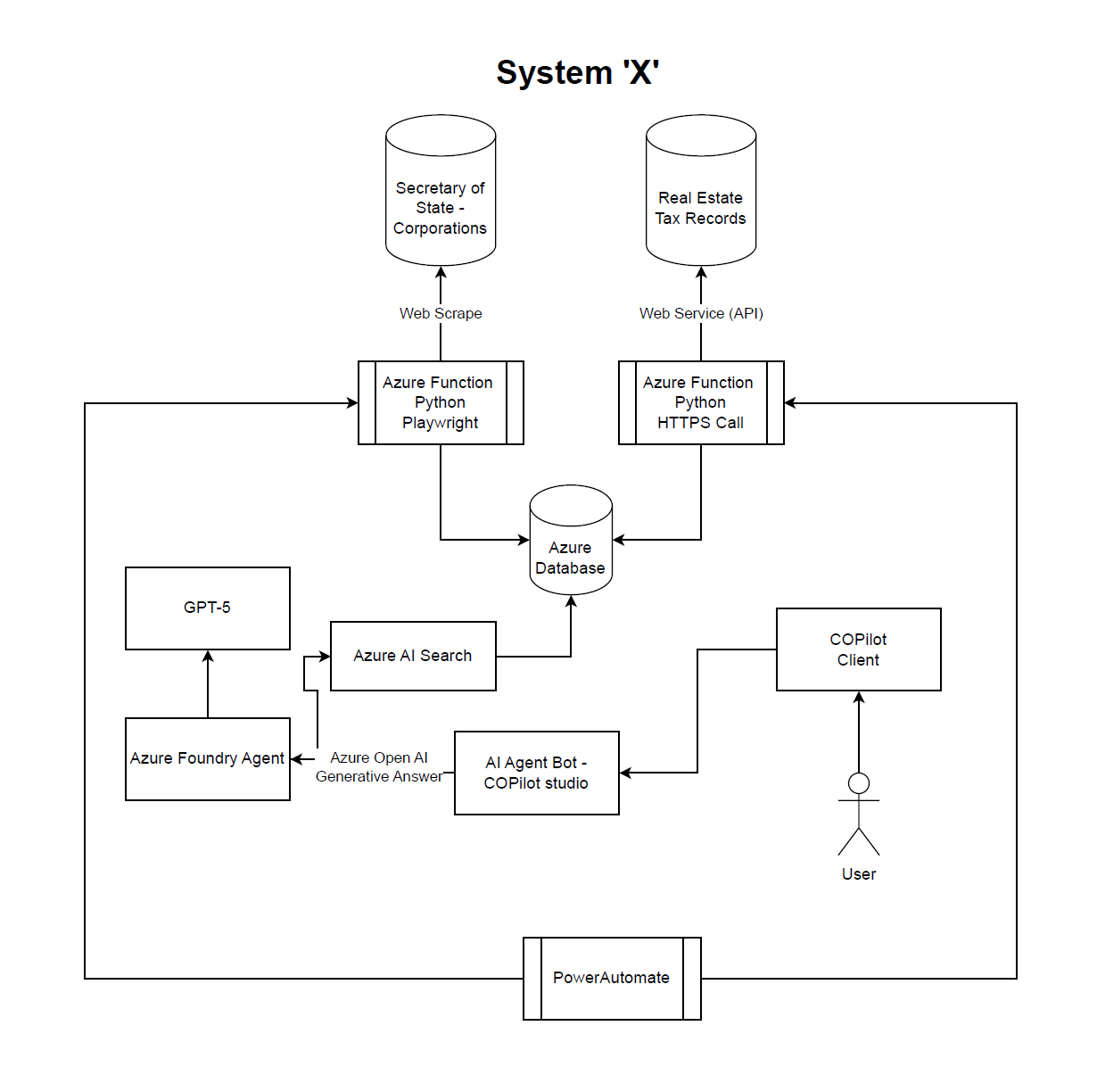
How it works
- Orchestration — Power Automate schedules and triggers the two collection functions, so data refreshes on a cadence without anyone running jobs by hand.
- Tax records — an Azure Function written in Python calls the real estate tax records web service over HTTPS and pulls the properties that match the target zoning and use, along with their owners of record.
- Corporate records — the Secretary of State’s corporation listings have no API, so a second Python Azure Function uses Playwright to drive a headless browser and scrape them, looking up each corporate owner to find the people behind it.
- Storage — both functions write to a single Azure SQL database, where properties, corporations and people are joined into leads.
- Search — Azure AI Search indexes the database so it can be queried by meaning, not just by exact field values.
- Conversation — users ask questions in the Copilot client. A Copilot Studio agent handles the conversation and hands questions to an Azure AI Foundry agent running GPT-5, which uses Azure OpenAI generative answers grounded in the Azure AI Search index. The answers come from the collected records, not from the model’s general knowledge.
Design choices
Each source is collected the way it allows: an API where one exists, browser automation where it doesn’t. Keeping the two collectors as separate functions means a change to the registry website breaks one scraper, not the pipeline. Collection and question-answering are decoupled by the database and search index, so users query a stable, already-joined dataset rather than waiting on live lookups against public sites. And putting the front end in Copilot means sales staff use a tool they already have, asking questions in plain language instead of learning a new application.
Phase II would look at data normalization: normalizing the collected records and storing the results in Azure SQL, so that questions a structured query can answer — and answers already worked out once — come straight from the database instead of a fresh AI call. Fewer AI calls means lower cost and faster answers.
SWIFT — Modernizing a Legacy Workflow
An oldie but a goodie. SWIFT is a reminder that modernization doesn’t always mean a rewrite. Sometimes the right move is to replace only the part that has stopped working and leave the rest alone.
The legacy system
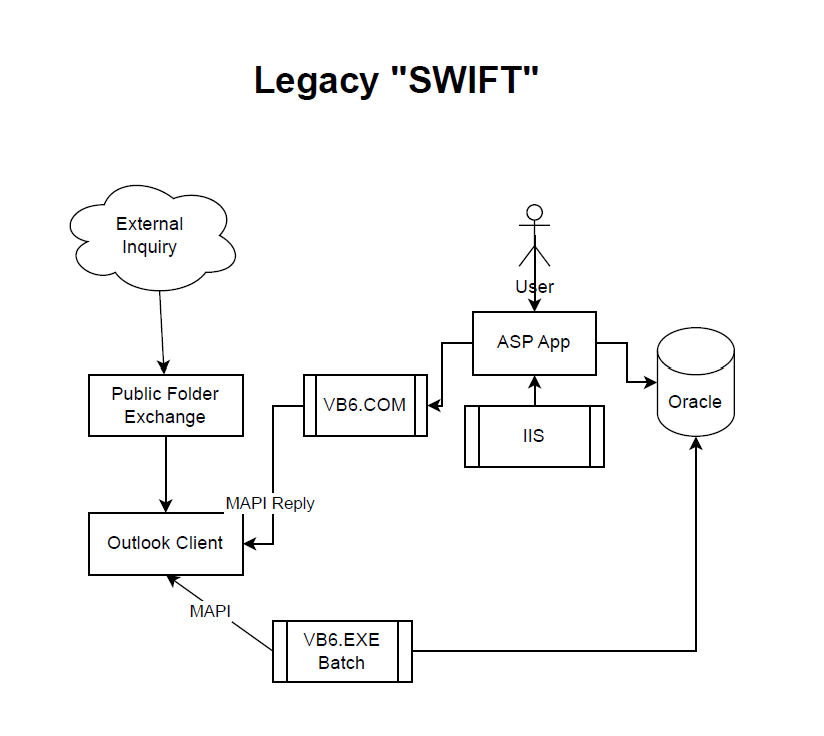
SWIFT sat on a server. External entities sent inquiries by email into an Exchange public folder, and a Visual Basic 6 batch process listened to an Outlook client over MAPI. When an email arrived, the VB6 executable read it and kicked off a workflow defined in its own code: the email was moved to a triage folder in Exchange, and the email’s details were written to tables in Oracle.
From there, a classic ASP application on IIS carried the workflow forward. Staff worked the inquiry through the ASP app, and when the internal process was complete, the app notified the external entity by sending a MAPI reply through a VB6 COM component.
What broke
The design worked well for years — until the company moved to Exchange Online. Exchange became an externalized service that no longer supported the MAPI access the VB6 components depended on. Both halves of SWIFT’s email handling, reading inquiries and sending replies, were tied to a protocol and a server that were going away. The replacement had to be asynchronous and work over a web layer.
The next-generation design
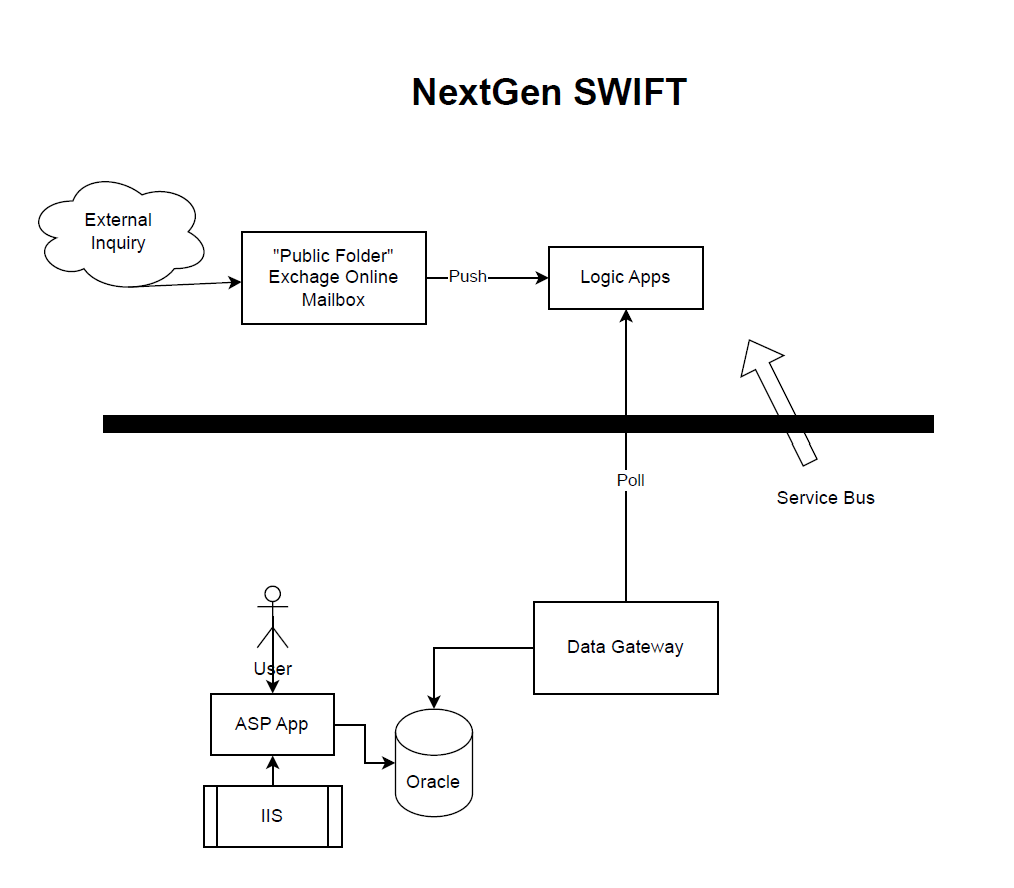
- Exchange Online — the public folder became an Exchange Online mailbox, which pushes each incoming inquiry to Logic Apps as it arrives. No client has to sit and listen.
- Logic Apps as the service bus — Azure Logic Apps, the precursor of Power Automate, became the service bus for all of SWIFT’s email transactions. The workflow logic that used to be compiled into the VB6 executable now lives in Logic Apps workflows.
- Data gateway — an on-premises data gateway polls Logic Apps from inside the network and writes to Oracle, so the cloud workflow reaches the on-premises database without opening it to inbound traffic.
- ASP app unchanged — the ASP application and its Oracle tables stayed exactly as they were, so the change had no impact on the customer or on the staff working inquiries.
The result replaced VB6 completely with a modern, asynchronous alternative, and removed the dependency on MAPI and a dedicated Outlook client.
Phase II
The planned next step was to replace the ASP app with Power Platform, moving the remaining on-premises workflow onto the same modern tooling as the email layer.
More
Further applications will be added as they are cleared for publication. To discuss any of this work in detail, reach me at stephen.choolfaian@outlook.com or on LinkedIn.