
Overview
Inferno is the engine Mandrake Interactive builds its own point-and-click adventures on. It is split into two layers. The Inferno engine layer holds everything reusable — the adventure and dialogue runtime, a facial animation bridge, the voice-over module, and editor tools and templates — and is copied into every game unchanged. The game layer holds what makes each title its own: rooms built from specs, the dialogue database and scenes, UI skins and voice clips.
Development is AI-assisted end to end. A Designer, an AI planning assistant, an AI coding agent and a set of generative AI services each have a defined role, connected through MCP (Model Context Protocol) servers. AI is used at edit time only: voice, art and models are baked into assets, so the shipped game makes no AI calls.
Tech Demos
General Game Play
General point-and-click functionality running in Inferno. This is the adventure runtime from the engine layer, the part every Mandrake Interactive game inherits.
General Game Play (Dark)
The same point-and-click functionality in a dark environment, showing how Inferno scenes handle low light under Unity 6's Universal Render Pipeline. Note the shadowing and the ambient light cast by the fireplace.
Dialogue
Inferno's dialogue system. Lips sync to the spoken lines, and the emotion tag on each line drives the characters' facial blend shapes. The voices are generated with ElevenLabs AI models on flat settings — synthesized at edit time and baked into the game as audio clips.
Reference Architecture
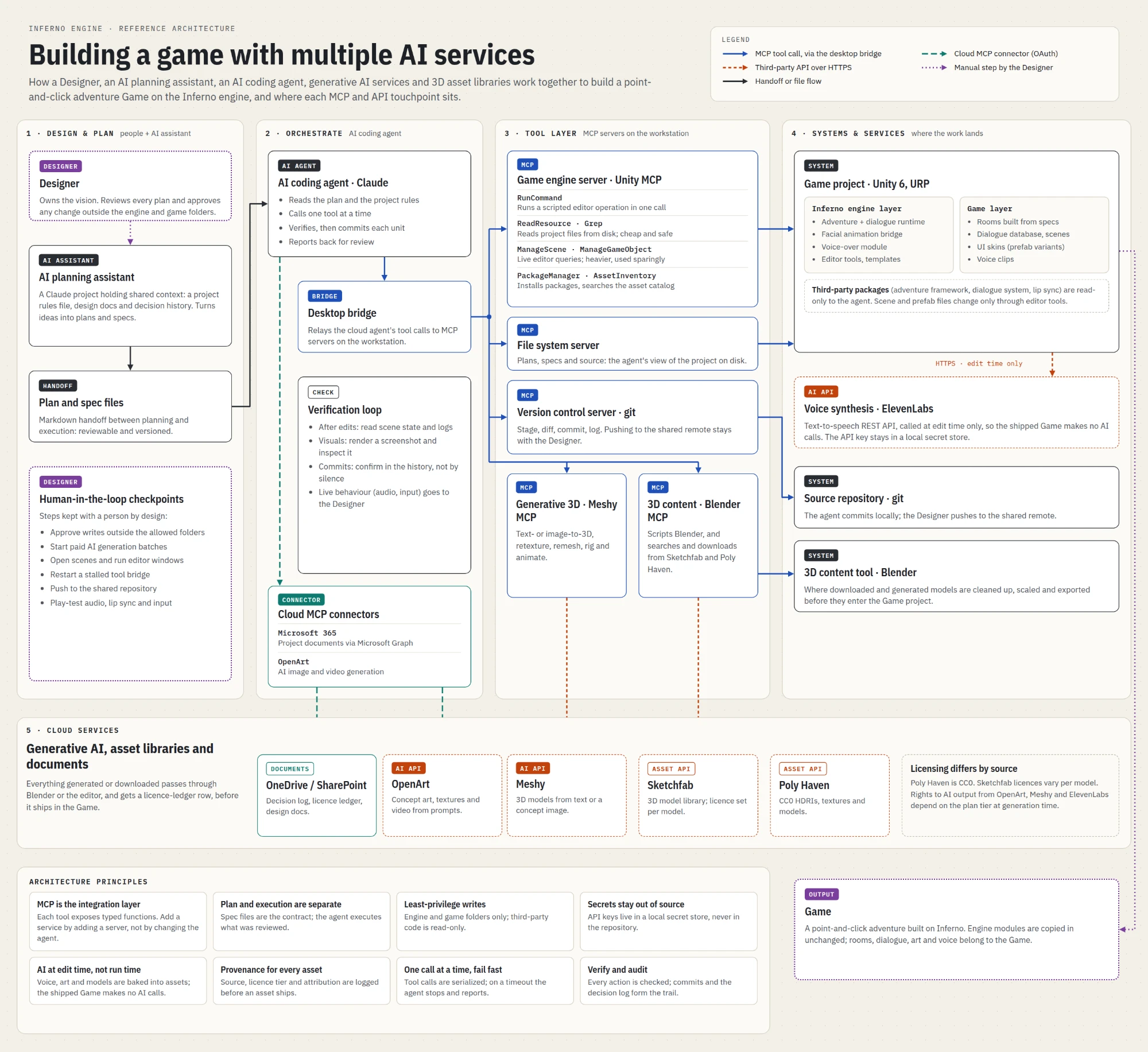
The schematic shows how the people, AI agents and services that build an Inferno game fit together, and where every MCP and API touchpoint sits. Read it left to right:
- Design & plan — the Designer owns the vision and works with an AI planning assistant (a Claude project holding the rules file, design docs and decision history) to turn ideas into Markdown plan and spec files. Those files are the handoff: reviewable and versioned.
- Orchestrate — an AI coding agent (Claude) reads the plan and project rules, calls one tool at a time, verifies the result and commits each unit of work. A desktop bridge relays its tool calls to the workstation, and a verification loop checks scene state, logs, rendered screenshots and commit history after every edit.
- Tool layer — MCP servers on the workstation expose typed functions: Unity for the game engine, a file system server, git for version control, Meshy for generative 3D and Blender for 3D content. Cloud connectors reach Microsoft 365 and OpenArt.
- Systems & services — where the work lands: the Unity 6 game project (engine layer and game layer), the source repository, Blender, and ElevenLabs for voice synthesis over HTTPS at edit time only.
- Cloud services — generative AI and asset libraries (OpenArt, Meshy, Sketchfab, Poly Haven) plus OneDrive and SharePoint for the decision log and licence ledger. Everything generated or downloaded passes through Blender or the editor and gets a licence-ledger row before it ships.
Principles
MCP is the integration layer, so a new service means a new server rather than a change to the agent. Planning and execution are separate: spec files are the contract, and the agent executes only what was reviewed. Writes are least-privilege — engine and game folders only, with third-party code read-only — and API keys live in a local secret store, never in the repository. Tool calls are serialized and fail fast, every asset carries its source, licence tier and attribution, and commits plus the decision log form the audit trail.
Some steps are deliberately kept with a person: approving writes outside the allowed folders, starting paid AI generation batches, pushing to the shared repository, and play-testing audio, lip sync and input.
Four Workflows, Step by Step
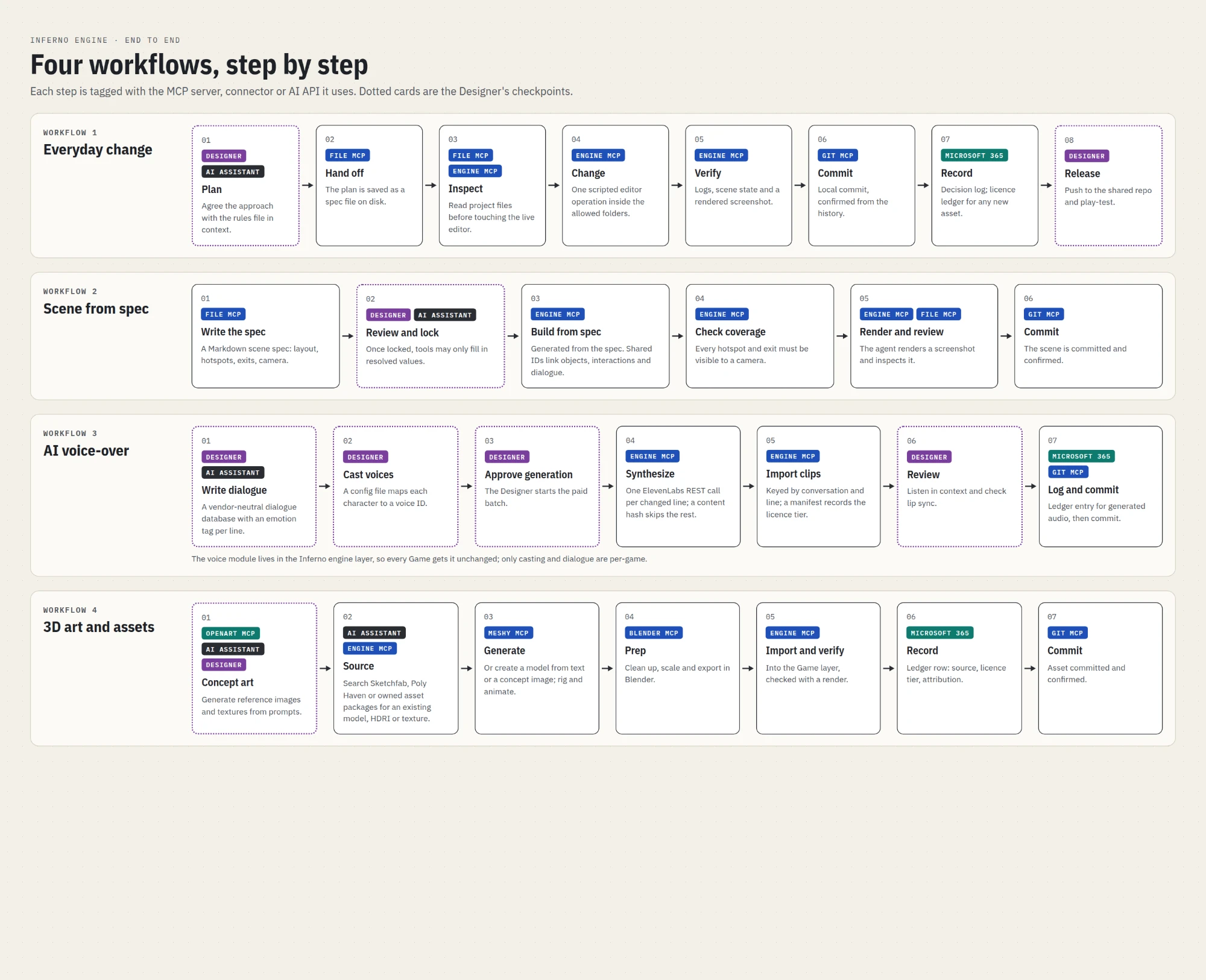
The architecture in motion. Each step is tagged with the MCP server, connector or AI API it uses, and dotted cards mark the Designer's checkpoints.
- Everyday change — plan with the AI assistant, hand off a spec file, inspect project files before touching the live editor, make one scripted change inside the allowed folders, verify with logs, scene state and a screenshot, commit, record the decision, and the Designer releases and play-tests.
- Scene from spec — a Markdown scene spec sets out layout, hotspots, exits and camera. Once the Designer locks it, the agent builds the scene from the spec, checks that every hotspot and exit is visible to a camera, renders a screenshot for review and commits.
- AI voice-over — dialogue is written into a vendor-neutral database with an emotion tag per line, and each character is cast to a voice ID. The Designer approves the paid batch, ElevenLabs synthesizes only the lines that changed, and the clips are imported with a manifest that records their licence tier before the Designer reviews lip sync in context.
- 3D art and assets — concept art from OpenArt, then either an existing model from Sketchfab, Poly Haven or owned asset packages, or a new one generated, rigged and animated in Meshy. The model is cleaned up, scaled and exported in Blender, imported and checked with a render, and logged with its source, licence tier and attribution.
Artifacts
- Inferno AI Architecture — the reference architecture and workflows (PDF, 2 pages)
More
To learn more about Mandrake Interactive and its games, visit MandrakeInteractive.com. To discuss Inferno in detail, reach me at stephen.choolfaian@outlook.com or on LinkedIn.